如果你剛好用 macOS,也剛好有裝 OrbStack,
OrbStack CLI(orb 指令)的指令可以幫你輕鬆建立與管理 Linux 虛擬機。
這邊就整理一下這些細節,用 orb 指令來管理 OrbStack 內建的虛擬機。
orb 指令說明
這邊列出 orb 指令的說明,後面會跟大家說要怎麼使用
Usage:
  orb create [flags] DISTRO[:VERSION] [MACHINE_NAME]

Aliases:
  create, add, new

Examples:
  orb create -a arm64 ubuntu:24.04
  orb create --memory 4G --cpus 2 --disk 64G ubuntu dev
  orb create -a amd64 fedora foo

Flags:
  -a, --arch string         Override the default architecture
      --cpus string         CPU core limit for the machine
      --disk string         Disk usage limit for the machine (GiB, or units like 64G)
      --forward-ssh-agent   Enable SSH agent forwarding for an isolated machine
  -h, --help                help for create
      --isolate-network     Block an isolated machine from other machines and host IPs
      --isolated            Create an isolated machine (disables file sharing and integration)
      --memory string       Memory limit for the machine (MiB, or units like 4G)
      --mount stringArray   Add a selective host mount for an isolated machine as SOURCE[:DEST] (repeatable)
  -p, --set-password        Set a password for the default user
  -u, --user string         Username for the default user
  -c, --user-data string    Path to Cloud-init user data file (for automatic setup)
核心指令語法
使用 orb create 即可快速建立新的 Linux 虛擬機器:
orb create [旗標] 發行版[:版本] [機器名稱]
別名(Aliases):create、add、new 皆可通用。
常用旗標(Flags)說明
旗標 / 參數
完整名稱
說明
-a
--arch
變更預設架構(例如:arm64 或 amd64)
--cpus
設定 CPU 核心數上限
--memory
設定記憶體上限(例如:4G、2048M)
--disk
設定磁碟容量上限(例如:64G)
-u
--user
指定預設使用者名稱
-p
--set-password
為預設使用者設定密碼
-c
--user-data
指定 Cloud-init 寫入檔路徑(用於自動化初始化設定)
--isolated
建立隔離機器(關閉檔案共享與系統整合)
--isolate-network
封鎖隔離機器存取其他機器與宿主機 IP
--forward-ssh-agent
為隔離機器啟用 SSH Agent 轉發
--mount
為隔離機器新增指定的宿主機掛載點(格式:來源[:目標],可重複使用)
一些快速上手的範例
1. 建立具有 Root 權限的獨立工作空間
若需要一個能隨意使用 sudo 測試安裝套件或準備素材的獨立環境,可以直接指定架構建立:
建立 x86 (amd64) 架構的 Ubuntu 虛擬機器
orb create --a amd64 ubuntu
進入該虛擬機器(以預設 ubuntu 為例)
orb -m ubuntu
進入之後你會發現提示詞有變化,會不一樣
就像你登入 SSH 一樣
然後就可以在這個環境自由的操作了
2. 其他各種常見的情境
這裏列出其他常見的指令範例,供參考
建立最新版 Ubuntu(自動命名)
orb create ubuntu
註:你可以用 tab 鍵去看有哪些發行版可以用,目前只支援 Linux 常見的發行版
官方也明確表示不支援 Windows 虛擬機
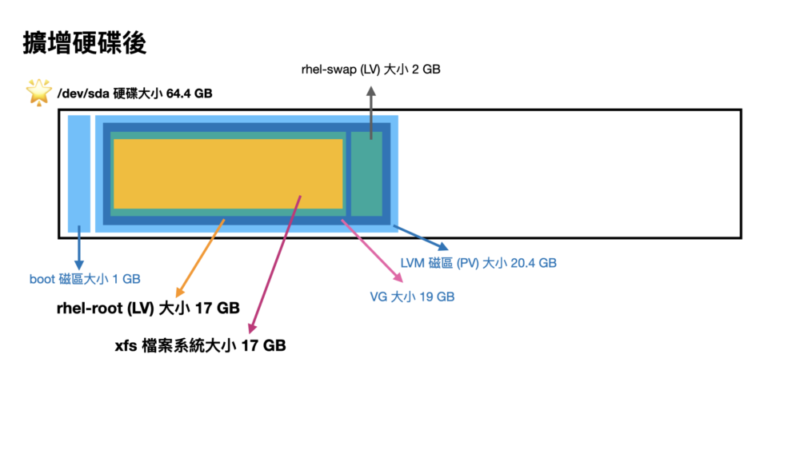
# vgdisplay -v
  --- Volume group ---
  VG Name               rhel
  System ID
  Format                lvm2
  Metadata Areas        1
  Metadata Sequence No  3
  VG Access             read/write
  VG Status             resizable
  MAX LV                0
  Cur LV                2
  Open LV               2
  Max PV                0
  Cur PV                1
  Act PV                1
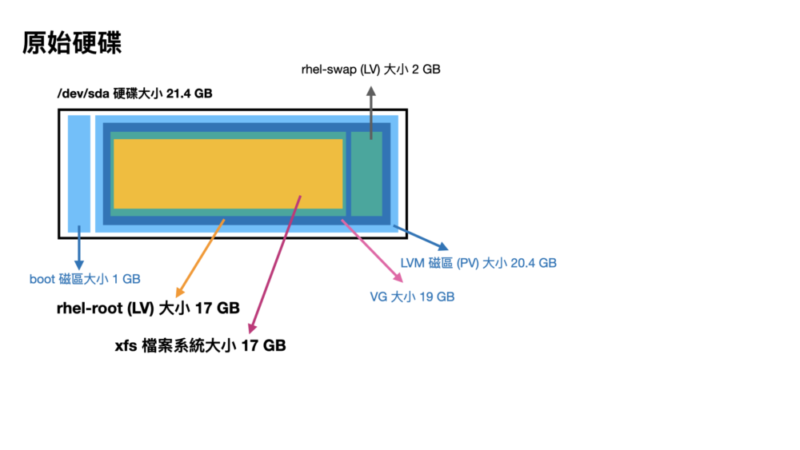
  VG Size               <19.00 GiB                         ### VG 容量只有 19GB
  PE Size               4.00 MiB
  Total PE              4863
  Alloc PE / Size       4863 / <19.00 GiB
  Free  PE / Size       0 / 0
  VG UUID               edb3Hx-xxxx-xxxx-xxxx-xxxx-xxxx-iiOyAf

  --- Logical volume ---
  LV Path                /dev/rhel/swap
  LV Name                swap
  VG Name                rhel
  LV UUID                ocf2IU-xxxx-xxxx-xxxx-xxxx-xxxx-BoYp70
  LV Write Access        read/write
  LV Creation host, time uatgit, 2023-08-21 18:06:42 +0800
  LV Status              available
  # open                 2
  LV Size                2.00 GiB
  Current LE             512
  Segments               1
  Allocation             inherit
  Read ahead sectors     auto
  - currently set to     8192
  Block device           253:1

  --- Logical volume ---
  LV Path                /dev/rhel/root
  LV Name                root
  VG Name                rhel
  LV UUID                5mZgRT-xxxx-xxxx-xxxx-xxxx-xxxx-0KHlI7
  LV Write Access        read/write
  LV Creation host, time uatgit, 2023-08-21 18:06:42 +0800
  LV Status              available
  # open                 1
  LV Size                <17.00 GiB                        ### LV 容量只有 17GB,前面有 2GB 是 Swap
  Current LE             4351
  Segments               1
  Allocation             inherit
  Read ahead sectors     auto
  - currently set to     8192
  Block device           253:0

  --- Physical volumes ---
  PV Name               /dev/sda2
  PV UUID               86HkpN-xxxx-xxxx-xxxx-xxxx-xxxx-Z6DNv4
  PV Status             allocatable
  Total PE / Free PE    4863 / 0
# vgdisplay -v
  --- Volume group ---
  VG Name               rhel
  System ID
  Format                lvm2
  Metadata Areas        1
  Metadata Sequence No  3
  VG Access             read/write
  VG Status             resizable
  MAX LV                0
  Cur LV                2
  Open LV               2
  Max PV                0
  Cur PV                1
  Act PV                1
  VG Size               <19.00 GiB                         ### VG 容量還是沒變,只有 19GB
  PE Size               4.00 MiB
  Total PE              4863
  Alloc PE / Size       4863 / <19.00 GiB
  Free  PE / Size       0 / 0
  VG UUID               edb3Hx-xxxx-xxxx-xxxx-xxxx-xxxx-iiOyAf

  --- Logical volume ---
  LV Path                /dev/rhel/swap
  LV Name                swap
  VG Name                rhel
  LV UUID                ocf2IU-xxxx-xxxx-xxxx-xxxx-xxxx-BoYp70
  LV Write Access        read/write
  LV Creation host, time uatgit, 2023-08-21 18:06:42 +0800
  LV Status              available
  # open                 2
  LV Size                2.00 GiB
  Current LE             512
  Segments               1
  Allocation             inherit
  Read ahead sectors     auto
  - currently set to     8192
  Block device           253:1

  --- Logical volume ---
  LV Path                /dev/rhel/root
  LV Name                root
  VG Name                rhel
  LV UUID                5mZgRT-xxxx-xxxx-xxxx-xxxx-xxxx-0KHlI7
  LV Write Access        read/write
  LV Creation host, time uatgit, 2023-08-21 18:06:42 +0800
  LV Status              available
  # open                 1
  LV Size                <17.00 GiB                         ### LV 容量也沒變,只有 17GB
  Current LE             4351
  Segments               1
  Allocation             inherit
  Read ahead sectors     auto
  - currently set to     8192
  Block device           253:0

  --- Physical volumes ---
  PV Name               /dev/sda2
  PV UUID               86HkpN-xxxx-xxxx-xxxx-xxxx-xxxx-Z6DNv4
  PV Status             allocatable
  Total PE / Free PE    4863 / 0
# parted
GNU Parted 3.1
Using /dev/sda
Welcome to GNU Parted! Type 'help' to view a list of commands.
(parted)
你可以在 parted 裡面輸入需要的指令,打 quit 離開互動式介面
先打 print 印出磁區列表,
(parted) print
Model: VMware Virtual disk (scsi)
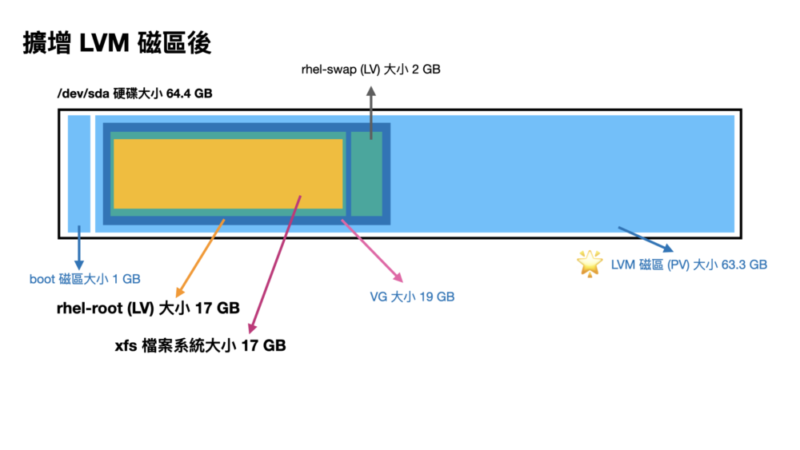
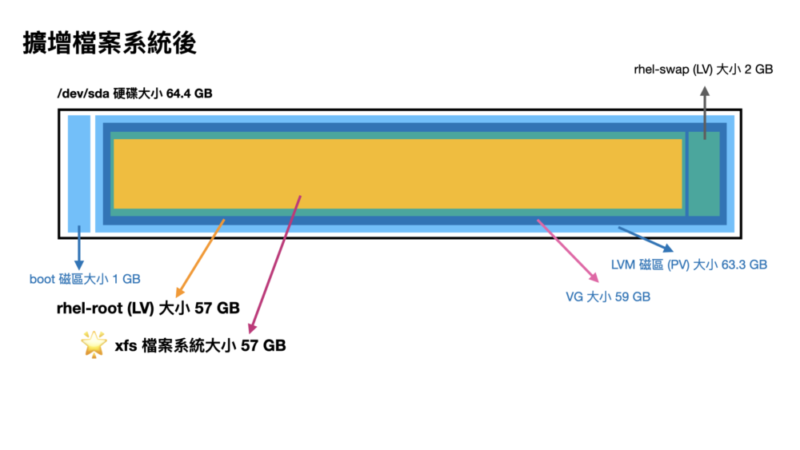
Disk /dev/sda: 64.4GB                                        ### 可以看到硬碟大小變成 64.4GB 了
Sector size (logical/physical): 512B/512B
Partition Table: msdos
Disk Flags:

Number  Start   End     Size    Type     File system  Flags
 1      1049kB  1075MB  1074MB  primary  xfs          boot
 2      1075MB  21.5GB  20.4GB  primary               lvm    ### 但 LVM 磁區只有 20.4GB
使用 resizepart 指令調整分割區大小
(parted) resizepart 2 100%
記得這個 2 要換成對應的數字
再印一次看看
(parted) print
Model: VMware Virtual disk (scsi)
Disk /dev/sda: 64.4GB
Sector size (logical/physical): 512B/512B
Partition Table: msdos
Disk Flags:

Number  Start   End     Size    Type     File system  Flags
 1      1049kB  1075MB  1074MB  primary  xfs          boot
 2      1075MB  64.4GB  63.3GB  primary               lvm    ### LVM 磁區擴增變成新的大小 63.3GB
打 quit 離開互動式介面
(parted) quit
Information: You may need to update /etc/fstab.
LVM 資訊看一下
# vgdisplay -v
  --- Volume group ---
  VG Name               rhel
  System ID
  Format                lvm2
  Metadata Areas        1
  Metadata Sequence No  3
  VG Access             read/write
  VG Status             resizable
  MAX LV                0
  Cur LV                2
  Open LV               2
  Max PV                0
  Cur PV                1
  Act PV                1
  VG Size               <19.00 GiB                         ### VG 容量還是沒變,只有 19GB
  PE Size               4.00 MiB
  Total PE              4863
  Alloc PE / Size       4863 / <19.00 GiB
  Free  PE / Size       0 / 0
  VG UUID               edb3Hx-xxxx-xxxx-xxxx-xxxx-xxxx-iiOyAf

  --- Logical volume ---
  LV Path                /dev/rhel/swap
  LV Name                swap
  VG Name                rhel
  LV UUID                ocf2IU-xxxx-xxxx-xxxx-xxxx-xxxx-BoYp70
  LV Write Access        read/write
  LV Creation host, time uatgit, 2023-08-21 18:06:42 +0800
  LV Status              available
  # open                 2
  LV Size                2.00 GiB
  Current LE             512
  Segments               1
  Allocation             inherit
  Read ahead sectors     auto
  - currently set to     8192
  Block device           253:1

  --- Logical volume ---
  LV Path                /dev/rhel/root
  LV Name                root
  VG Name                rhel
  LV UUID                5mZgRT-xxxx-xxxx-xxxx-xxxx-xxxx-0KHlI7
  LV Write Access        read/write
  LV Creation host, time uatgit, 2023-08-21 18:06:42 +0800
  LV Status              available
  # open                 1
  LV Size                <17.00 GiB                         ### LV 容量也沒變,只有 17GB
  Current LE             4351
  Segments               1
  Allocation             inherit
  Read ahead sectors     auto
  - currently set to     8192
  Block device           253:0

  --- Physical volumes ---
  PV Name               /dev/sda2
  PV UUID               86HkpN-xxxx-xxxx-xxxx-xxxx-xxxx-Z6DNv4
  PV Status             allocatable
  Total PE / Free PE    4863 / 0
Step4. 擴增 PV
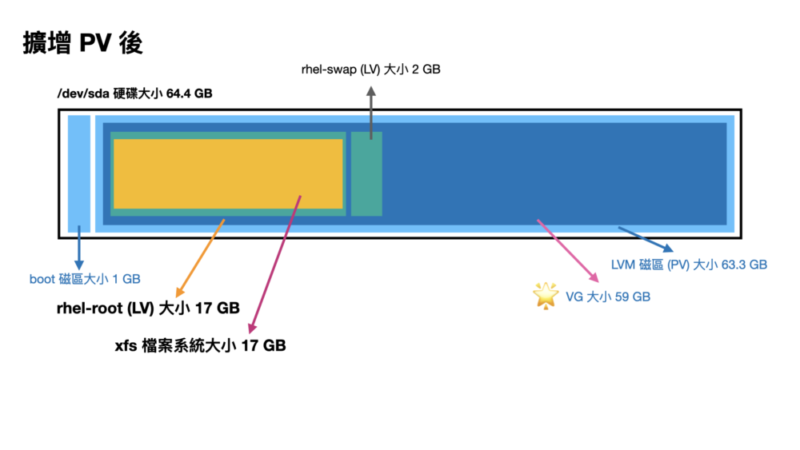
我們用 pvresize 調整 PV 的大小
# pvresize /dev/sda2
  Physical volume "/dev/sda2" changed
  1 physical volume(s) resized or updated / 0 physical volume(s) not resized
再次印一次 LVM 資訊看看
# vgdisplay -v
  --- Volume group ---
  VG Name               rhel
  System ID
  Format                lvm2
  Metadata Areas        1
  Metadata Sequence No  4
  VG Access             read/write
  VG Status             resizable
  MAX LV                0
  Cur LV                2
  Open LV               2
  Max PV                0
  Cur PV                1
  Act PV                1
  VG Size               <59.00 GiB                         ### VG 容量變大了 59GB
  PE Size               4.00 MiB
  Total PE              15103
  Alloc PE / Size       4863 / <19.00 GiB
  Free  PE / Size       10240 / 40.00 GiB                  ### 跑出了一些 PE 大小
  VG UUID               edb3Hx-xxxx-xxxx-xxxx-xxxx-xxxx-iiOyAf

  --- Logical volume ---
  LV Path                /dev/rhel/swap
  LV Name                swap
  VG Name                rhel
  LV UUID                ocf2IU-xxxx-xxxx-xxxx-xxxx-xxxx-BoYp70
  LV Write Access        read/write
  LV Creation host, time uatgit, 2023-08-21 18:06:42 +0800
  LV Status              available
  # open                 2
  LV Size                2.00 GiB
  Current LE             512
  Segments               1
  Allocation             inherit
  Read ahead sectors     auto
  - currently set to     8192
  Block device           253:1

  --- Logical volume ---
  LV Path                /dev/rhel/root
  LV Name                root
  VG Name                rhel
  LV UUID                5mZgRT-xxxx-xxxx-xxxx-xxxx-xxxx-0KHlI7
  LV Write Access        read/write
  LV Creation host, time uatgit, 2023-08-21 18:06:42 +0800
  LV Status              available
  # open                 1
  LV Size                <17.00 GiB                       ### LV 容量沒變,還是 17GB
  Current LE             4351
  Segments               1
  Allocation             inherit
  Read ahead sectors     auto
  - currently set to     8192
  Block device           253:0

  --- Physical volumes ---
  PV Name               /dev/sda2
  PV UUID               86HkpN-xxxx-xxxx-xxxx-xxxx-xxxx-Z6DNv4
  PV Status             allocatable
  Total PE / Free PE    15103 / 10240                  ### 跑出了一些 Free PE 出來(因為我們還沒調整)
Step5. 擴增 LV
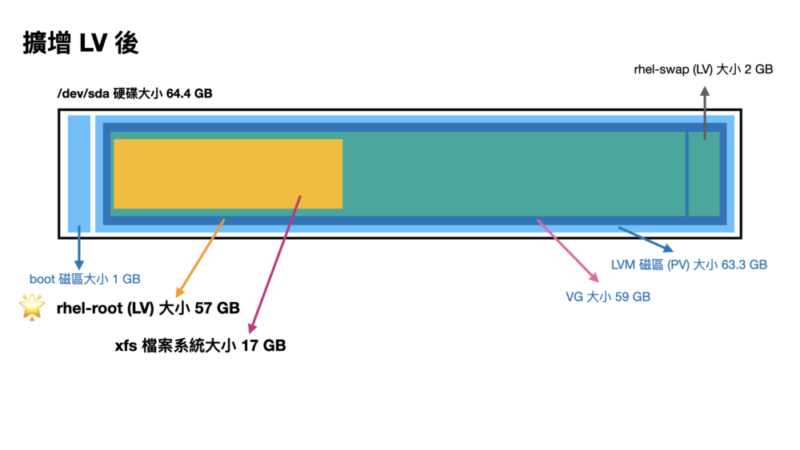
我們使用 lvextend 擴大 LV 大小
# lvextend -l +100%FREE /dev/rhel/root
  Size of logical volume rhel/root changed from <17.00 GiB (4351 extents) to <57.00 GiB (14591 extents).
  Logical volume rhel/root successfully resized.
再次印一次 LVM 資訊看看
# vgdisplay -v
  --- Volume group ---
  VG Name               rhel
  System ID
  Format                lvm2
  Metadata Areas        1
  Metadata Sequence No  5
  VG Access             read/write
  VG Status             resizable
  MAX LV                0
  Cur LV                2
  Open LV               2
  Max PV                0
  Cur PV                1
  Act PV                1
  VG Size               <59.00 GiB                         ### VG 容量沒問題 59GB
  PE Size               4.00 MiB
  Total PE              15103
  Alloc PE / Size       15103 / <59.00 GiB
  Free  PE / Size       0 / 0
  VG UUID               edb3Hx-xxxx-xxxx-xxxx-xxxx-xxxx-iiOyAf

  --- Logical volume ---
  LV Path                /dev/rhel/swap
  LV Name                swap
  VG Name                rhel
  LV UUID                ocf2IU-xxxx-xxxx-xxxx-xxxx-xxxx-BoYp70
  LV Write Access        read/write
  LV Creation host, time uatgit, 2023-08-21 18:06:42 +0800
  LV Status              available
  # open                 2
  LV Size                2.00 GiB
  Current LE             512
  Segments               1
  Allocation             inherit
  Read ahead sectors     auto
  - currently set to     8192
  Block device           253:1

  --- Logical volume ---
  LV Path                /dev/rhel/root
  LV Name                root
  VG Name                rhel
  LV UUID                5mZgRT-xxxx-xxxx-xxxx-xxxx-xxxx-0KHlI7
  LV Write Access        read/write
  LV Creation host, time uatgit, 2023-08-21 18:06:42 +0800
  LV Status              available
  # open                 1
  LV Size                <57.00 GiB                         ### LV 容量變大了 57GB
  Current LE             14591
  Segments               1
  Allocation             inherit
  Read ahead sectors     auto
  - currently set to     8192
  Block device           253:0

  --- Physical volumes ---
  PV Name               /dev/sda2
  PV UUID               86HkpN-xxxx-xxxx-xxxx-xxxx-xxxx-Z6DNv4
  PV Status             allocatable
  Total PE / Free PE    15103 / 0                           ### 沒有 Free PE 了